Welcome Back

Enter your details to access your account.

OR

Free E-commerce HTML CSS Template – EFLYER STORE Free Download

FREE
2.3
86 ratings
1,534 Downloads
Feb 4 Updated
0 Views
0 Comments

Introduction The EFLYER STORE is a fully responsive E-commerce HTML CSS Template designed for modern online stores. Whether you’re selling fashion, electronics, or any other product category, this E-commerce HTML CSS Template ensures a seamless shopping experience with a stylish and professional design. This free E-commerce HTML CSS Template includes a user-friendly interface, engaging product display sections, and an optimized checkout process. Key Components 1. Header Section The header of...

100% Malware Free
Quality Checked
12 Month Support

Product Preview

5 images
Free E-commerce HTML CSS Template – EFLYER STORE Free Download
View Gallery
Preview 2
Preview 3
Preview 4
+1
Tested & Verified Working on latest WP
Free Updates Lifetime updates
Need Help? Contact support

Detailed Description

Introduction

The EFLYER STORE is a fully responsive E-commerce HTML CSS Template designed for modern online stores. Whether you’re selling fashion, electronics, or any other product category, this E-commerce HTML CSS Template ensures a seamless shopping experience with a stylish and professional design.

E-commerce HTML CSS Template

This free E-commerce HTML CSS Template includes a user-friendly interface, engaging product display sections, and an optimized checkout process.

Key Components

1. Header Section

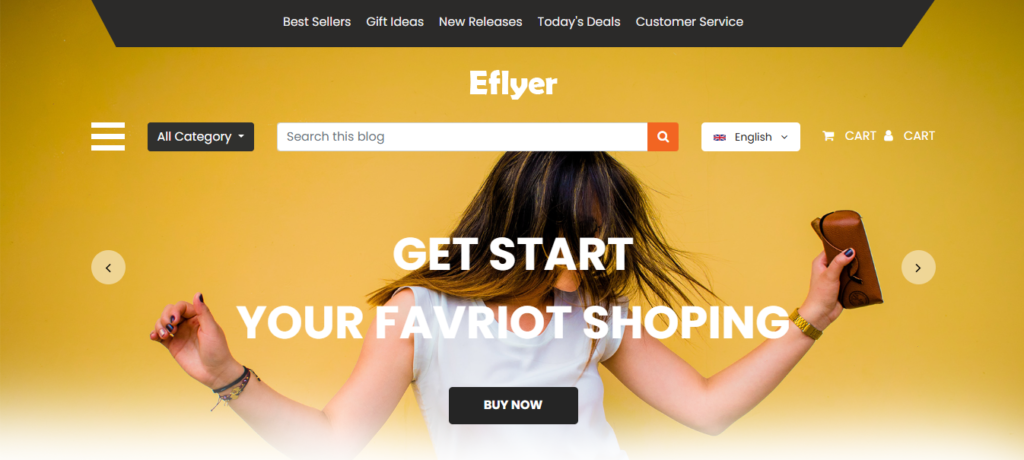
The header of the E-commerce HTML CSS Template is designed for easy navigation and user engagement. Key elements include:

  • Top Menu Bar: Displays promotional links for discounts, offers, and announcements.
  • Logo Section: A prominent space for brand identity.
  • Main Navigation:
    • Sidebar toggle for mobile-friendly navigation.
    • Category dropdown for easy browsing.
    • Search bar for quick product discovery.
    • Language selector for multilingual support.
    • Cart and user account links for a seamless shopping experience.

🔗 Learn More About E-commerce Header Design

2. Banner Section

  • Full-Width Carousel Slider: Engaging banners showcasing featured products and offers.
  • Call-to-Action (CTA) Buttons: Encourages users to explore deals and shop now.
  • Responsive Design: Adapts to various screen sizes.
  • Navigation Arrows: Allows users to browse different slides effortlessly.

🔗 Best Practices for E-commerce Banner Design

3. Product Sections

Fashion Section

  • Carousel Display: Showcases fashion products in a dynamic layout.
  • Three Products Per Slide: Optimized for visual appeal and user interaction.
  • Product Cards Include:
    • High-quality product image (e.g., alt=”Trendy Men’s Jacket – E-commerce HTML CSS Template”).
    • Title and brief description.
    • Price display for quick decision-making.
    • “Buy Now” and “See More” buttons for smooth navigation.

🔗 Shop Latest Fashion

Electronics Section

  • Structured Similar to Fashion Section: Ensures design consistency.
  • Showcases Electronic Products: Includes Laptops, Mobiles, and Computers.
  • Product Details and Pricing: Displays key specifications and price ranges.

🔗 Discover Top Electronics

4. Footer Section

  • Newsletter Subscription Form: Encourages users to sign up for promotions and updates.
  • Quick Links Menu: Provides easy access to essential pages like About, Contact, Privacy Policy.
  • Customer Service Contact: Displays support email, phone number, and working hours.
  • Copyright Information: Ensures brand credibility and protection.

Browser Compatibility

  • Optimized for modern browsers like Chrome, Firefox, Safari, and Edge.
  • IE support through conditional comments for compatibility with older versions.
  • Fully responsive design ensuring a seamless experience on mobile devices.

Customization Points

1. Color Scheme

  • Primary Color: #f26522 (Orange) for brand consistency.
  • Text Colors: #262626 for readability and #ffffff for contrast.
  • Background Colors: Customizable via CSS for personalization.

2. Layout Modifications

  • Modular Structure: Allows easy addition or removal of sections.
  • Bootstrap Grid System: Enables effortless layout customization.
  • Adjustable Responsive Breakpoints: Modify CSS settings for device-specific optimizations.

3. Content Management

  • Product Images: Easily replaceable in the images directory (use descriptive alt tags like “E-commerce HTML CSS Template Fashion”).
  • Product Information: Can be updated directly in HTML.
  • Categories: Modify dropdown menu items to align with your store’s inventory.

E-commerce UI/UX Best Practices:
🔗 https://www.shopify.com/enterprise/ecommerce-design-best-practices

Guide to Designing a Perfect E-commerce Header:
🔗 https://www.nngroup.com/articles/navigation-design-ecommerce/

Best Practices for E-commerce Banner Design:
🔗 https://blog.hubspot.com/marketing/ecommerce-homepage-design

Explore Fashion E-commerce Strategies:
🔗 https://www.bigcommerce.com/blog/fashion-ecommerce/

Top Trends in Electronics E-commerce:
🔗 https://www.forbes.com/sites/forbestechcouncil/2023/07/12/the-future-of-electronics-e-commerce/

Learn More About Bootstrap Grid System:
🔗 https://getbootstrap.com/docs/5.0/layout/grid/

How to Optimize Product Images for SEO:
🔗 https://moz.com/learn/seo/image-optimization

Check Out More E-commerce Resources:
🔗 https://www.w3schools.com/html/html_ecommerce.asp

Key Features

Fully Responsive

Works perfectly on all devices and screen sizes

Cross-Browser

Compatible with all modern browsers

Clean Code

Well-documented and easy to customize

Fast Loading

Optimized for speed and performance

Customizable

Easy to modify colors, fonts, and layouts

Great Support

Dedicated support team ready to help

Installation Guide

1

Download the Product

Click the download button to get the ZIP file. Extract it to a folder on your computer.

2

Upload to WordPress

Go to your WordPress admin panel → Appearance → Themes → Add New → Upload Theme

3

Activate & Configure

Click activate and configure the settings according to your needs in the Customizer.

4

Start Using

Your product is now ready! Start creating amazing content with your new tool.

Version History

v1.2.0 December 15, 2023
  • NEW Added dark mode support
  • IMPROVED Performance optimization
  • FIXED Mobile navigation issues
v1.1.0 November 10, 2023
  • NEW Added custom widgets
  • IMPROVED Better documentation

Comments & Reviews

Leave a Reply

Your email address will not be published. Required fields are marked *

Rate this Product

Share your experience with others
Select a rating