Ecommerce Website Project in PHP/MYSQL Free Download
FREE
1.5
102 ratings
2,918 Downloads
Oct 26Updated
0Views
0Comments
Build a dynamic ecommerce website with PHP and MySQL. Manage products and enable online shopping with ease.
100% Malware Free
Quality Checked
12 Month Support
Product Preview
6 images
View Gallery
+2
Tested & VerifiedWorking on latest WP
Free UpdatesLifetime updates
Need Help?Contact support
Gallery
Detailed Description
This project is a comprehensive onlineecommerce website meticulously developed using PHP and MySQL, making it an ideal solution for final-year IT students working on significant college projects. The website integrates all the crucial features necessary for a fully functional ecommerce platform, offering a complete and practical tool for online shopping.
Users can seamlessly manage products, including adding, updating, and removing items from the inventory. The website provides an intuitive shopping experience, allowing customers to browse through product categories, view detailed product information, and make secure purchases online. The inclusion of advanced search functionalities and user account management ensures a smooth and personalized shopping journey.
In addition to its robust backend infrastructure, which ensures reliable performance and data management, the project also emphasizes a user-friendly interface. This facilitates ease of use for both administrators and end-users, making it accessible and efficient for various ecommerce operations.
For students and developers, this project offers valuable insights into ecommerce websitedevelopment, including practical experience with database integration, session management, and security practices. It is an excellent educational resource, providing hands-on experience with core web technologies and ecommerce functionalities essential for creating dynamic and scalable online stores.
Technologies:
HTML: Page layout and design
CSS: Design
JS: Frontend
PHP: Backend
Bootstrap
Java Script
Supported Operating Systems:
You can run this project in the following operating systems:
Windows
MAC
Linux
Features:
1-Client-Side Interaction.
2-Admin Panel.
3-Customer Registration.
4-Add to Cart System.
5-Checkout System.
6-Update Billing Address.
7-Search, Filter Products.
8-Product Categories.
9-Featured Products.
10-Latest Products.
11-Popular Products.
12-View Order History.
13-Update Customer Profile.
14-Manage Website Settings.
15-Manage Shop Settings.
16-Product Management.
17-Order Management.
18-Pending Orders.
19-Shippings.
20-Set up Image Sliders.
21-Set Shipping Charges.
22-Page Settings.
23-Set Social Media Links.
24-Subscribers.
25-View Registered Customers.
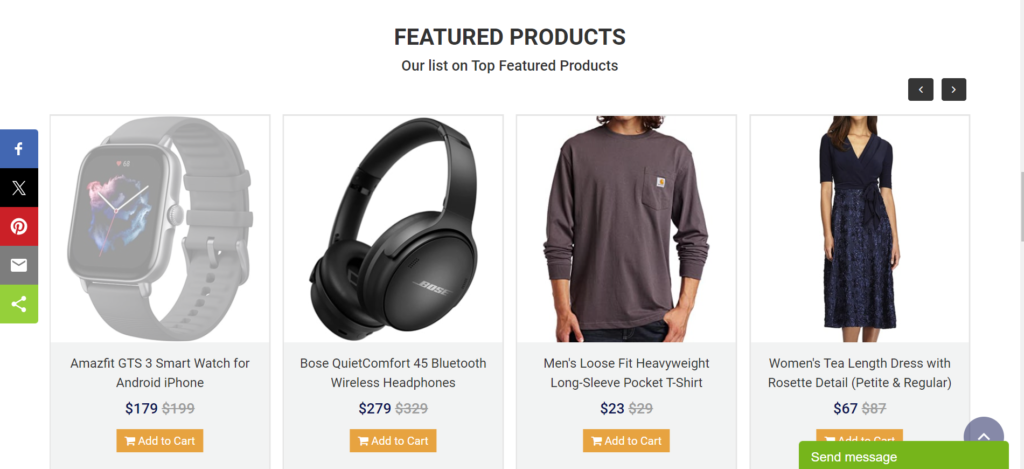
Featured, Latest and Popular Products:
When developing ecommerce projects, the website needs to include certain sections to ensure user satisfaction. This approach not only enhances user experience but also fosters a strong, interactive relationship between users and the website.
To enhance user interaction, the featured section allows users to engage more with specific products, potentially increasing their popularity. This section is designed to draw attention to highlighted items, encouraging users to explore them. Similarly, the ‘latest products’ section showcases a selection of newly added items, giving users a glimpse of the most recent additions to the catalog.
Similarly, In this ecommerce website project, the total number of views for each product is tracked to determine their popularity. The most viewed items are automatically featured in a ‘popular’ category. The system administrator can fully control these features, including adjusting the number of products displayed in each section.
Cart, Product Category, View Customer’s Order, and More:
When it comes to the product categories, users can easily navigate between sections with just a click. This functionality allows the site to present all products associated with the chosen category. For instance, selecting the “Men’s” category will display items designed for men.
The entire website is designed with a comprehensive navigation system from top to bottom, making it easy for users to interact with. A cart feature is also included, which allows users to add items to their cart for the checkout process. This section is equipped with all the necessary features like cart updates, item removal, and more.
Additionally, customers have the option to view their order history from their profile page. They can access information such as product names, payment details, quantities, pricing, and shipping status. Moreover, each customer has the option to update their billing address, modify their profile, and change their password.
Admin Panel:
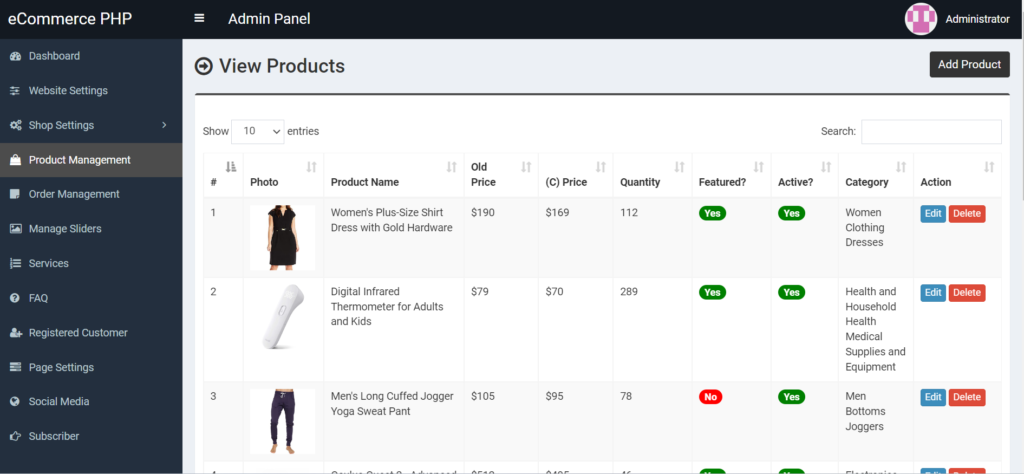
In the admin panel, the administrator has comprehensive control over the system. They are responsible for overseeing the smooth operation of various aspects of the website. This includes managing website settings, image sliders, products, orders, and customer information.
Administrators can update settings related to the website’s header and footer, brand elements, and other site details. They also can configure shop settings, including colors, sizes, shipping costs, and product categories. These categories are organized into top, mid, and end levels to help with product display and management, and are reflected in the website’s navigation menu.
Additionally, the administrator can oversee image sliders, adjust page settings, and manage the services section for the client-facing side of the website.
Installation:
After Starting Apache and MySQL in XAMPP, follow the following steps:
1st Step: Extract file
2nd Step: Copy the main project folder
3rd Step: Paste in xampp/htdocs/
Now Connecting Database 4th Step: Open a browser and go to URL “http://localhost/phpmyadmin/”
5th Step: Click on the databases tab
6th Step: Create a database named “ecommerceweb” and then click on the import tab
7th Step: Click on browse the file and select “ecommerceweb.sql” file which is inside “DATABASE” folder
8th Step: Click on go.
After Creating Database,
9th Step: Open a browser and go to URL “http://localhost/eCommerce-website-in-PHP”
Need Help or Customization?
Feel free to contact me if you need assistance with setup, customization, or any other support. I’m here to help and provide the best solutions for your needs.
Key Features
Fully Responsive
Works perfectly on all devices and screen sizes
Cross-Browser
Compatible with all modern browsers
Clean Code
Well-documented and easy to customize
Fast Loading
Optimized for speed and performance
Customizable
Easy to modify colors, fonts, and layouts
Great Support
Dedicated support team ready to help
Installation Guide
1
Download the Product
Click the download button to get the ZIP file. Extract it to a folder on your computer.
2
Upload to WordPress
Go to your WordPress admin panel → Appearance → Themes → Add New → Upload Theme
3
Activate & Configure
Click activate and configure the settings according to your needs in the Customizer.
4
Start Using
Your product is now ready! Start creating amazing content with your new tool.