Introduction Floix Portfolio Template is a modern, one-page Bootstrap template designed for professionals looking to build a standout online resume or portfolio. Whether you’re a freelancer, designer, or developer, this responsive and user-friendly template allows you to showcase your skills and projects effectively. Built with HTML, CSS, JavaScript, and Bootstrap, it ensures seamless adaptability across different screen sizes and devices. Features Header Section Banner Section Introduction Section Works Section Contact...
100% Malware Free
Quality Checked
12 Month Support
Product Preview
3 images
View Gallery
Tested & VerifiedWorking on latest WP
Free UpdatesLifetime updates
Need Help?Contact support
Gallery
Detailed Description
Introduction
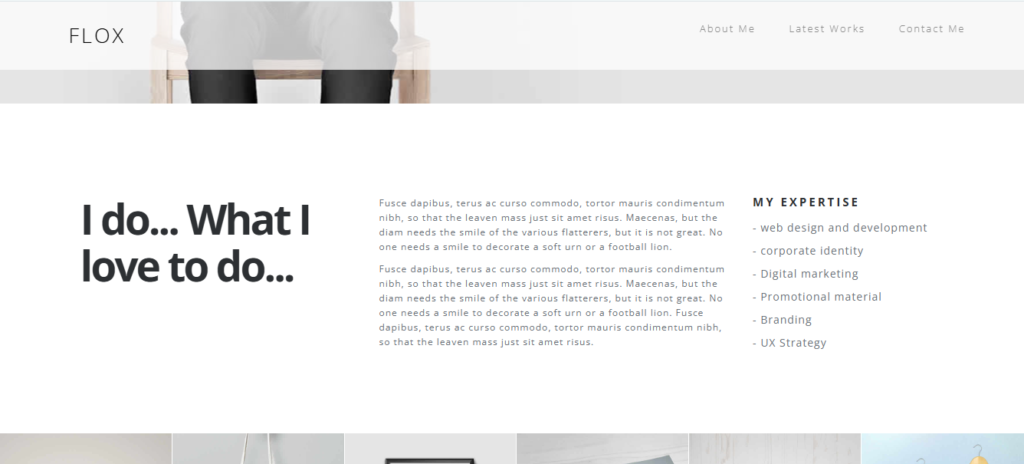
Floix Portfolio Template is a modern, one-page Bootstrap template designed for professionals looking to build a standout online resume or portfolio. Whether you’re a freelancer, designer, or developer, this responsive and user-friendly template allows you to showcase your skills and projects effectively. Built with HTML, CSS, JavaScript, and Bootstrap, it ensures seamless adaptability across different screen sizes and devices.
Features
Header Section
Unique Design: The Floix Portfolio Template features a stylish and structured layout to highlight your professional journey.
Responsive Navigation: A well-designed menu ensures easy access to different sections.
Optimized Performance: Lightweight and optimized for fast loading.
Banner Section
Call-To-Action (CTA): Includes a prominent button to direct visitors to detailed information.
Stylish Grid Layout: Uses the Bootstrap grid system for balanced content alignment.
Introduction Section
About Me: Share personal and professional details.
Skills & Expertise: Display skills in a bullet point format.
Work Ethos & Achievements: Write engaging paragraphs highlighting your career milestones.
Works Section
Portfolio Grid: Displays projects in a clean grid format.
Hover Effects: Enhances visual appeal with a search icon overlay.
Lightbox Feature:Fancybox integration for full-size image previews.
Contact Section
Contact Details: Includes address, phone number, and email.
Social Media Links: Easily link to Facebook, Twitter, LinkedIn, and GitHub.
Secure Contact Form: Add a functional PHP-based contact form (optional backend integration).
Technologies Used
Frontend Technologies
HTML5: Defines the content structure.
CSS3: Handles styles, animations, and responsiveness.
Bootstrap: Ensures a fully responsive design.
JavaScript & jQuery: Adds interactive elements.
Fancybox: Lightbox functionality for image previews.
Retina.js: Supports high-resolution images.
Font Awesome: Provides scalable vector icons.
Backend (Optional)
While the Floix Portfolio Template is primarily a frontend template, it can be integrated with backend technologies such as PHP, MySQL, or Node.js for dynamic content.
Key Files and Directories
HTML File
index.html: The main file containing the page structure.
CSS Directory
bootstrap.min.css: Bootstrap framework for responsive design.
main.css: Custom styles.
responsive.css: Styles for smaller screens.
animate.min.css: Animations.
jquery.fancybox.css: Styles for Fancybox.
JavaScript Directory
bootstrap.min.js: Bootstrap scripts.
jquery.fancybox.pack.js: Fancybox scripts.
retina.min.js: High-resolution image support.
modernizr.js: Compatibility checks.
main.js: Custom project scripts.
Images Directory
Contains all the image assets for the project.
Setup Instructions
Step 1: Download the Template
Clone or download the Floix Portfolio Template files.
Step 2: Include Dependencies
Ensure Bootstrap, jQuery, and Font Awesome are linked properly.
Step 3: Edit Content
Replace placeholder text, images, and links with your own content.
Step 4: Run Locally
Open index.html in a web browser to preview the Floix Portfolio Template.
Step 5: Deploy
Upload files to a web hosting service such as GitHub Pages, Netlify, or a personal server.
Usage Scenarios
Freelancers & Job Seekers: Showcase professional skills and portfolio.
Designers & Developers: Display creative projects and case studies.
Corporate Professionals: Build an online resume for potential clients and employers.
Frameworks & Libraries: jQuery, Bootstrap, Fancybox, and Retina.js.
The Floix Portfolio Template is a fantastic choice for professionals who need a modern, sleek, and responsive website. Start building your portfolio today and impress potential clients with a visually appealing online presence! 🚀
Why Choose Floix Portfolio Template?
Floix Portfolio Template is designed to help professionals create a stunning online presence with ease. Whether you’re a freelancer, developer, designer, or job seeker, this template offers all the essential features to showcase your skills and achievements. The clean design, fast loading speed, and smooth animations ensure a professional and engaging user experience.
Customization & Scalability
This template is easy to customize, allowing users to tweak colors, fonts, and layout elements without much effort. Whether you’re a beginner or an experienced developer, the well-structured code makes it simple to modify and scale as needed.
Key Features
Fully Responsive
Works perfectly on all devices and screen sizes
Cross-Browser
Compatible with all modern browsers
Clean Code
Well-documented and easy to customize
Fast Loading
Optimized for speed and performance
Customizable
Easy to modify colors, fonts, and layouts
Great Support
Dedicated support team ready to help
Installation Guide
1
Download the Product
Click the download button to get the ZIP file. Extract it to a folder on your computer.
2
Upload to WordPress
Go to your WordPress admin panel → Appearance → Themes → Add New → Upload Theme
3
Activate & Configure
Click activate and configure the settings according to your needs in the Customizer.
4
Start Using
Your product is now ready! Start creating amazing content with your new tool.