Welcome Back

Enter your details to access your account.

OR

5 Reasons to Download the Free App Showcase Template – HTML CSS JavaScript Free Download

FREE
1.8
95 ratings
1,412 Downloads
Feb 3 Updated
0 Views
0 Comments

Download the Free App Showcase Template, built with HTML, CSS, and JavaScript. A responsive and modern template perfect for developers showcasing their apps. Free download available now! Are you looking for a clean, modern, and fully responsive template to showcase your mobile app? The Free App Showcase Template is perfect for developers and businesses alike, offering an intuitive, easy-to-use design that looks great on all devices. Whether you’re launching a...

100% Malware Free
Quality Checked
12 Month Support

Product Preview

6 images
5 Reasons to Download the Free App Showcase Template – HTML CSS JavaScript Free Download
View Gallery
Preview 2
Preview 3
Preview 4
+2
Tested & Verified Working on latest WP
Free Updates Lifetime updates
Need Help? Contact support

Detailed Description

Download the Free App Showcase Template, built with HTML, CSS, and JavaScript. A responsive and modern template perfect for developers showcasing their apps. Free download available now!

Free App Showcase Template

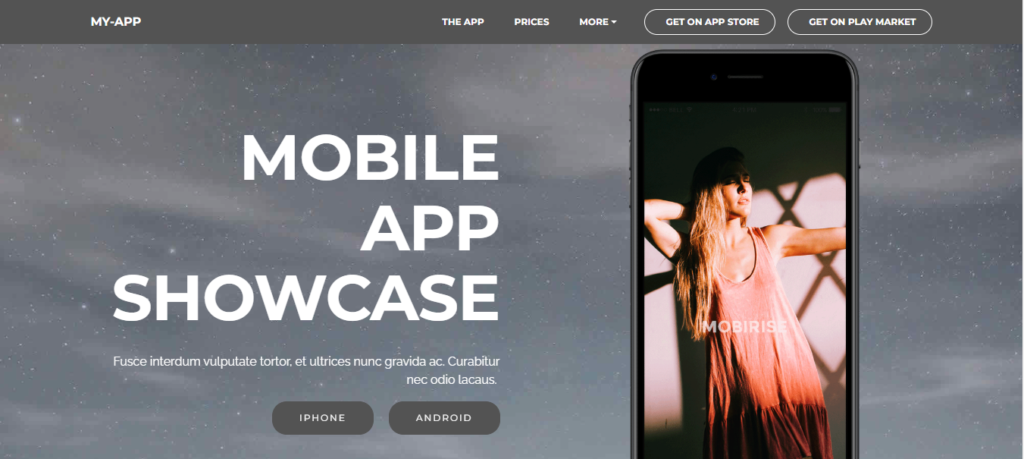
Are you looking for a clean, modern, and fully responsive template to showcase your mobile app? The Free App Showcase Template is perfect for developers and businesses alike, offering an intuitive, easy-to-use design that looks great on all devices. Whether you’re launching a new app or need to update your existing showcase, this template is a great choice.

Built using HTML, CSS, and JavaScript, the Free App Showcase Template ensures that your app is presented in a visually appealing and user-friendly way. It’s not only a powerful tool for showcasing mobile apps, but it’s also completely free to download, so you can get started with minimal cost.

Free App Showcase Template

Key Features of the Free App Showcase Template

  1. Responsive Design
    With the Free App Showcase Template, you don’t have to worry about compatibility across devices. The template is designed to work seamlessly on mobile, tablet, and desktop screens. Using modern CSS and JavaScript technologies, the template automatically adapts to any screen size, ensuring your app looks stunning on all devices. For further insights on responsive web design, check out the CSS Tricks Guide on Responsive Design to enhance your understanding.
  2. Call-to-Action (CTA) Buttons
    One of the most important aspects of any app showcase is making it easy for users to download your app. This template includes Call-to-Action (CTA) Buttons that are designed to guide users directly to the App Store and Play Store with ease. These high-contrast buttons stand out and make it simple for users to take action and download your app. Learn more about designing effective CTA buttons on UX Design.
  3. Feature Highlights Section
    Highlighting the features of your app is crucial in convincing users to give it a try. This template includes a Feature Highlights Section that allows you to showcase your app’s key functionalities with interactive cards. You can use icons, animations, and other customizations to make your app features stand out in an engaging way, capturing user interest right away. You can read more about feature presentation strategies at Smashing Magazine.
  4. Parallax Backgrounds
    The Free App Showcase Template offers a smooth and visually rich experience with Parallax Backgrounds. This effect adds depth and creates a sense of movement, giving your showcase a more dynamic and modern feel. For a better understanding of parallax scrolling, check out this article on A List Apart.
  5. Video Tutorial Section
    Use the Video Tutorial Section to provide users with a detailed guide on how your app works. This section supports YouTube, Vimeo, and even self-hosted videos, so you can easily embed instructional videos to enhance user understanding. Video tutorials are a great way to showcase your app’s features in a more interactive and engaging manner. Explore more about using video content for tutorials at Wistia.
  6. Testimonials
    To build trust with potential users, the template includes a Testimonials Section. You can showcase real user reviews, adding credibility to your app and helping to establish trust among potential downloaders. Social proof is one of the most effective ways to encourage new users to give your app a try. For a more in-depth explanation of testimonials in web design, check out Nielsen Norman Group.
  7. Contact Information
    It’s important to stay connected with your users. The Free App Showcase Template provides a dedicated section for Contact Information. Here, you can add your customer support information, links to social media pages, and even embed contact forms directly in the footer. This ensures that users can easily reach out for any support or inquiries they may have. For more on contact page best practices, visit HubSpot’s Contact Page Tips.

Conclusion

The Free App Showcase Template is a powerful tool for app developers looking to present their creations in an attractive, professional, and responsive manner. With features like interactive cards, CTA buttons, parallax effects, and a testimonials section, this template will help you engage your audience and drive downloads. Best of all, it’s completely free to download, so you can start showcasing your app without any cost.

Don’t wait – download the Free App Showcase Template today and start showcasing your app in the best way possible!

Key Features

Fully Responsive

Works perfectly on all devices and screen sizes

Cross-Browser

Compatible with all modern browsers

Clean Code

Well-documented and easy to customize

Fast Loading

Optimized for speed and performance

Customizable

Easy to modify colors, fonts, and layouts

Great Support

Dedicated support team ready to help

Installation Guide

1

Download the Product

Click the download button to get the ZIP file. Extract it to a folder on your computer.

2

Upload to WordPress

Go to your WordPress admin panel → Appearance → Themes → Add New → Upload Theme

3

Activate & Configure

Click activate and configure the settings according to your needs in the Customizer.

4

Start Using

Your product is now ready! Start creating amazing content with your new tool.

Version History

v1.2.0 December 15, 2023
  • NEW Added dark mode support
  • IMPROVED Performance optimization
  • FIXED Mobile navigation issues
v1.1.0 November 10, 2023
  • NEW Added custom widgets
  • IMPROVED Better documentation

Comments & Reviews

Leave a Reply

Your email address will not be published. Required fields are marked *

Rate this Product

Share your experience with others
Select a rating