Online Railway Reservation System Project In PHP/MySQL Free Download
FREE
Be the first to rate!
774 Downloads
Oct 26Updated
0Views
0Comments
A PHP and MySQL-based Online Railway Reservation System for efficient ticket booking and management, ideal for IT students' projects
100% Malware Free
Quality Checked
12 Month Support
Product Preview
3 images
View Gallery
Tested & VerifiedWorking on latest WP
Free UpdatesLifetime updates
Need Help?Contact support
Gallery
Detailed Description
Our Online Railway Reservation System is a user-friendly web application built with PHP and MySQL, designed to simplify the process of booking train tickets. Whether you’re managing a single journey or multiple trips, the platform provides an efficient way to search for trains, check seat availability, and book tickets—all in just a few clicks.
This system is not only perfect for everyday users who need a reliable way to book their tickets but is also an excellent project for second-year IT students. It offers essential features like train schedules, fare calculations, seat selection, and real-time booking status, making it a comprehensive learning tool.
Built with scalability in mind, the system can handle multiple users and transactions, ensuring a smooth experience for both passengers and admins. The intuitive design makes it easy for beginners to navigate, while the technical architecture offers students the opportunity to understand and work with real-world programming concepts.
Key Features:
Online Ticket Booking: Users can easily book tickets through an intuitive online interface, mimicking real-world ticket reservation processes.
User Management: The system allows users to manage their bookings, view travel history, and handle ticket cancellations.
Database Integration: Built with MySQL, the application ensures reliable data storage and management for bookings and user information.
Why This Project?
Practical Application: The system mirrors real-life scenarios, providing students with hands-on experience in developing a functional online reservation system.
Comprehensive Features: The project includes all the necessary functionalities for managing railway reservations, making it a valuable tool for educational purposes.
This Online Railway Reservation System offers a practical and realistic approach to learning web development, combining essential features with a user-friendly interface.
Technologies:
HTML: Page layout and design
CSS: Design
JS: Frontend
PHP: Backend
Bootstrap
Java Script
Supported Operating Systems:
You can run this project in the following operating systems:
Windows
MAC
Linux
Features:
Admin Panel
Passengers Panel
Employee Panel
Passengers Management
Train Management
Online Train Ticket Bookings
Cancel Ticket Bookings
View, Print Tickets
View, Update User Profiles
Search Available Trains
Employee Management
Manage Tickets
Approved, Pending Tickets
Accounting Overview
About Online Railway Reservation System PHP Project
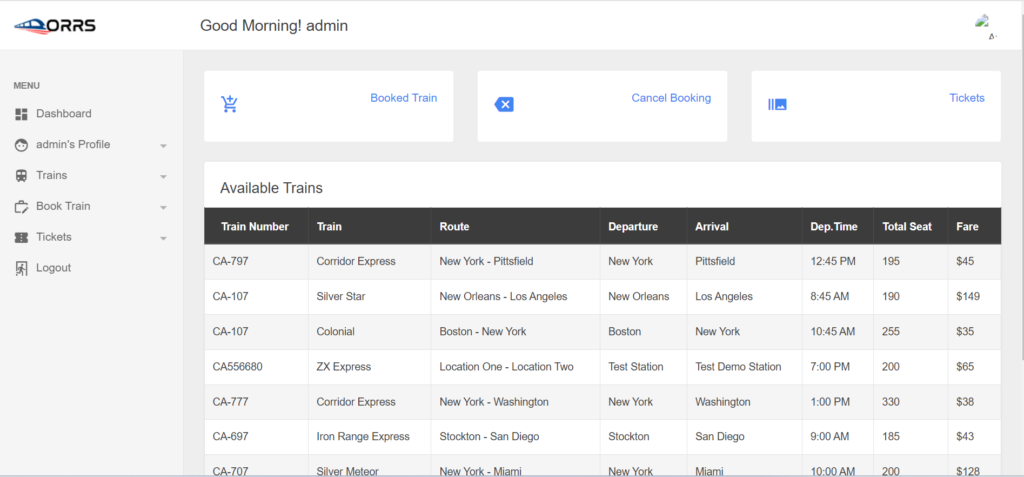
In particular, this Railway Management System Project in PHP focuses mainly on managing online train tickets. To be more precise, the system helps to keep track of all online ticket bookings and information. Also, the system displays all the available passengers and routes.
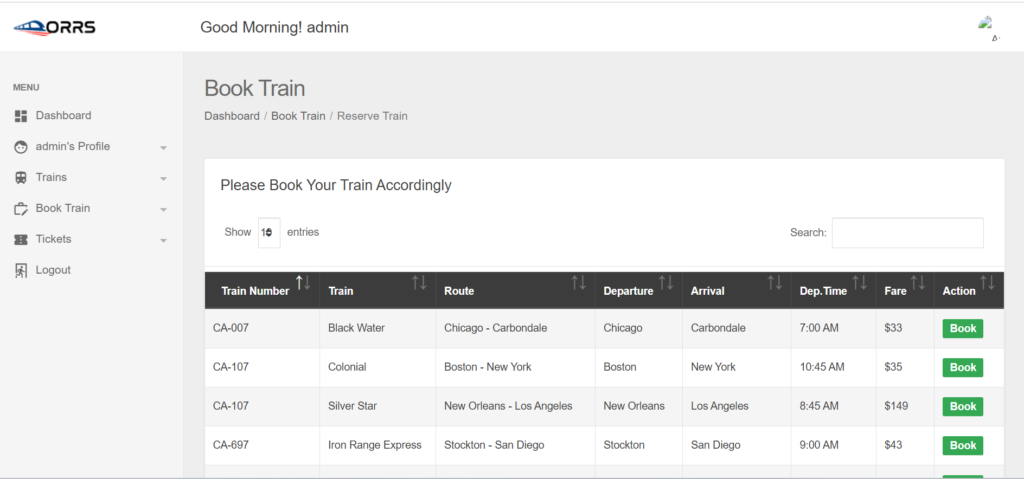
In addition, the system allows adding up train, and ticket details too(codeastro.com). Evidently, this project contains an admin panel with an employee and passenger panel. In an overview of this web application, passengers can simply register themselves and log into the system in order to book online tickets. He/she can view a list of available trains with their routes, fares, and others respectively. With it, passengers can book trains by selecting any. For this, the passenger has to check out the online train reservation by providing a payment code. At last, the passengers can view their tickets from the ticket section.
Admin Panel
An admin has full control over the system. He/she can manage passengers, trains, accounting, and so on. Here, every section has its respective details such as name, and other important details.
Here, an admin can add passenger records directly by filling up the required forms. During the passenger registration, an admin has to provide details such as name, address, contact, and set up login details. The administrator can also manage employee members for the system(scriptandtools.com).
Train Management
When it comes to projects such as the Online Train Ticket Booking System, it’s a must that it should contain a section to cover train details too. And there is one. For this online train ticket system project, the administrator can manage train records easily. Not just with ease, but also it helps to cover up all the important and required information for the system.
Train Ticket Management
Moreover, the tickets section is divided into three categories, Pending, Approved, and Management. As mentioned earlier, all the confirmed payments from the passenger’s ticket reservation are stored here for the admin’s approval. Here, the administrator can view a list of pending tickets with details such as the name of the passenger with his/her booking details.
The admin can view payment codes from every passenger’s ticket reservations. In short, an admin has to mark and confirm the payment manually. Now talking about train ticket management, this section is where the administrator can either update the ticket details or delete the train ticket reservations.
Employee Panel, Accounting, and More
Moreover, the tickets section is divided into three categories, Pending, Approved, and Management. As mentioned earlier, all the confirmed payments from the passenger’s ticket reservation are stored here for the admin’s approval. Here, the administrator can view a list of pending tickets with details such as the name of the passenger with his/her booking details.
In short, an admin has to mark and confirm the payment manually. Now talking about train ticket management, this section is where the administrator can either update the ticket details or delete the train ticket reservations.
Employee Panel, Accounting, and More
Talking about the employee panel, there’s a bit of a similar access level for the employees in this system. An employee can also manage train details, passengers, and tickets. Speaking of tickets, it has the same access as the administrator where the user can manage pending train tickets. The employees can also view a list of passenger reservations with detailed information(scriptandtools.com).
Moving toward the accounting section [Admin Panel], this section displays total sales generated only after the confirmation from the passenger’s train ticket. In addition to it, the accounting section also highlights the overall reservation numbers. With it, the system also plots out total figures of paid and pending ticket reservations using a pie chart. The user can also export the pie chart data in image format. Besides, both admin and employee can view and update their profiles.
Installation:
After Starting Apache and MySQL in XAMPP, follow the following steps:
1st Step: Extract file
2nd Step: Copy the main project folder
3rd Step: Paste in xampp/htdocs/
Now Connecting Database 4th Step: Open a browser and go to URL “http://localhost/phpmyadmin/”
5th Step: Click on the Databases tab
6th Step: Create a database named “fyp-railway-reservation” and then click on the import tab
7th Step: Click on browse the file and select “fyp-railway-reservation.sql” file which is inside “DATABASE” folder
8th Step: Click on go.
After Creating Database,
9th Step: Open a browser and go to URL “http://localhost/ONLINE-RAILWAY-RESERVATION-IN-PHP”
Need Help or Customization?
If you need assistance with setup, customization, or any other support, feel free to contact me. I’m here to help and provide the best solutions for your needs.
.
Key Features
Fully Responsive
Works perfectly on all devices and screen sizes
Cross-Browser
Compatible with all modern browsers
Clean Code
Well-documented and easy to customize
Fast Loading
Optimized for speed and performance
Customizable
Easy to modify colors, fonts, and layouts
Great Support
Dedicated support team ready to help
Installation Guide
1
Download the Product
Click the download button to get the ZIP file. Extract it to a folder on your computer.
2
Upload to WordPress
Go to your WordPress admin panel → Appearance → Themes → Add New → Upload Theme
3
Activate & Configure
Click activate and configure the settings according to your needs in the Customizer.
4
Start Using
Your product is now ready! Start creating amazing content with your new tool.