Welcome Back

Enter your details to access your account.

OR

JUSTO Restaurant Website Template | HTML CSS JavaScript | 100% Free Download

FREE
Be the first to rate!
332 Downloads
Feb 4 Updated
0 Views
0 Comments

🚀 Download the JUSTO Restaurant Website Template for free! Built with HTML, CSS, and JavaScript, this fully responsive and SEO-friendly template is designed for restaurants, cafés, and food businesses looking for a modern online presence. 🏆 Why Choose the JUSTO Restaurant Website Template? 🌟 Key Features of JUSTO Restaurant Template 🔝 1. Sticky Navigation Bar 🍽 2. Stunning Header Section 🍲 3. Specials Section – Featured Dishes 📖 4. About...

100% Malware Free
Quality Checked
12 Month Support

Product Preview

6 images
JUSTO Restaurant Website Template | HTML CSS JavaScript | 100% Free Download
View Gallery
Preview 2
Preview 3
Preview 4
+2
Tested & Verified Working on latest WP
Free Updates Lifetime updates
Need Help? Contact support

Detailed Description

🚀 Download the JUSTO Restaurant Website Template for free! Built with HTML, CSS, and JavaScript, this fully responsive and SEO-friendly template is designed for restaurants, cafés, and food businesses looking for a modern online presence.

JUSTO Restaurant Website Template Free Download

🏆 Why Choose the JUSTO Restaurant Website Template?

  • 100% Free Download – No hidden charges.
  • SEO-Optimized – Higher rankings on search engines.
  • Fully Responsive – Works on mobile, tablet, and desktop.
  • Easy to Customize – Modify colors, layout, and images effortlessly.

🌟 Key Features of JUSTO Restaurant Template

🔝 1. Sticky Navigation Bar

  • Fixed top navbar for smooth navigation.
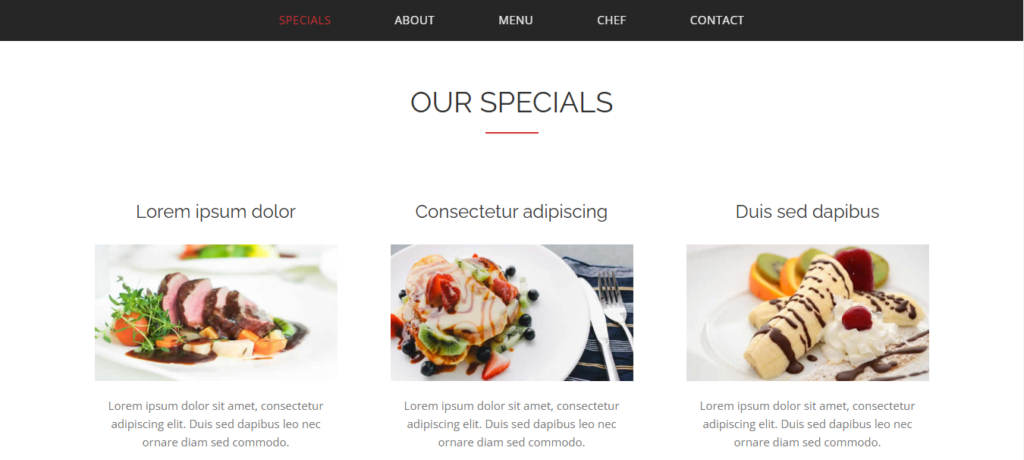
  • Sections: Specials, About, Menu, Chef, Contact.
  • Mobile-friendly with a hamburger menu for easy browsing.

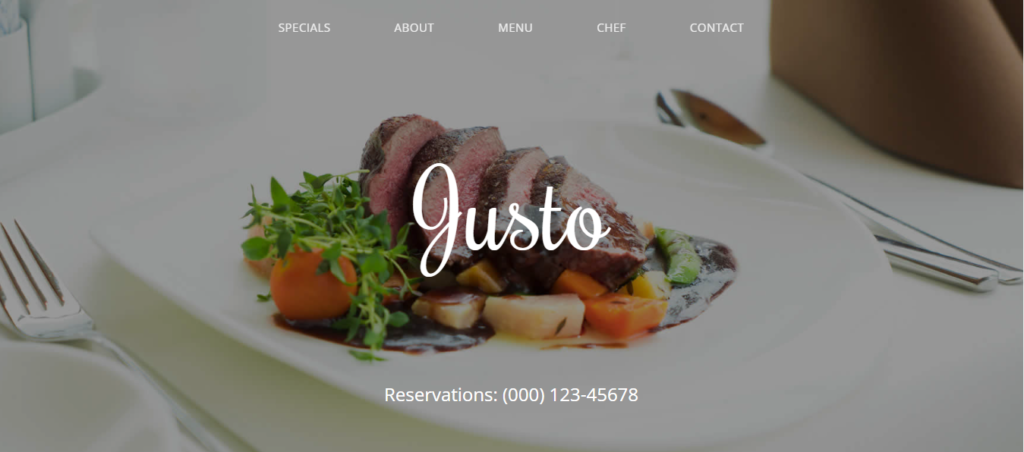
🍽 2. Stunning Header Section

  • Displays restaurant name with reservation details.
  • Interactive call-to-action buttons (“Book a Table”).
  • Engaging design that attracts visitors immediately.

🍲 3. Specials Section – Featured Dishes

  • Highlight chef’s specials with high-quality images.
  • Organized in a responsive grid layout.
  • Dish descriptions and pricing available.

📖 4. About Us – Build Customer Trust

  • Story behind the JUSTO Restaurant.
  • Professional images and videos of chefs, kitchen, and dining space.

📜 5. Menu Section – Categorized Dishes

  • Well-structured menu with categories:
    • Breakfast & Starters
    • Main Course
    • Dinner & Desserts
  • Each dish includes:
    • Name, price, and description.
    • Easy-to-read format with clear typography.

💡 6. Fully Responsive & Mobile-Friendly

  • Designed with Bootstrap 5 for seamless experience on all devices.
  • Fast page speed for better user engagement.

📞 7. Contact Section – Easy Inquiry & Reservation

  • Google Maps integration to show restaurant location.
  • Inquiry form for name, email, subject, and message.
  • Social media links to Facebook, Instagram, and Twitter.

Justo

⚙️ Technology Stack – Built with Modern Web Technologies

HTML5 – Clean structure and semantic elements.
CSS3 – Responsive design with animations.
Bootstrap – Flexible grid system and mobile-first approach.
JavaScript & jQuery – Smooth scrolling and interactive elements.


🌐 External Resources


🔗 Internal Links – Explore More Templates


📥 Download JUSTO Restaurant Template for Free!

🔗 Download JUSTO Restaurant Template Now

📞 Need Help? Contact Us
📧 Email: support@yourwebsite.com
📞 Phone: +1-800-123-4567

With the JUSTO Restaurant Website Template, you can create a stunning online presence for your restaurant, café, or food business. This fully responsive, SEO-optimized, and easy-to-customize template is designed to help you attract more customers and grow your brand. Download today and get started!

Key Features

Fully Responsive

Works perfectly on all devices and screen sizes

Cross-Browser

Compatible with all modern browsers

Clean Code

Well-documented and easy to customize

Fast Loading

Optimized for speed and performance

Customizable

Easy to modify colors, fonts, and layouts

Great Support

Dedicated support team ready to help

Installation Guide

1

Download the Product

Click the download button to get the ZIP file. Extract it to a folder on your computer.

2

Upload to WordPress

Go to your WordPress admin panel → Appearance → Themes → Add New → Upload Theme

3

Activate & Configure

Click activate and configure the settings according to your needs in the Customizer.

4

Start Using

Your product is now ready! Start creating amazing content with your new tool.

Version History

v1.2.0 December 15, 2023
  • NEW Added dark mode support
  • IMPROVED Performance optimization
  • FIXED Mobile navigation issues
v1.1.0 November 10, 2023
  • NEW Added custom widgets
  • IMPROVED Better documentation

Comments & Reviews

Leave a Reply

Your email address will not be published. Required fields are marked *

Rate this Product

Share your experience with others
Select a rating